
Create a Wallet
Understand what a new wallet creates and which information represents control.
Start here →A multi-chain wallet, blockchain network and Web3 knowledge hub from imtoken
Use imtoken to learn how multi-chain assets, network selection, receiving, sending, DApp connections, signatures, approvals and wallet security fit together before you take action on chain.
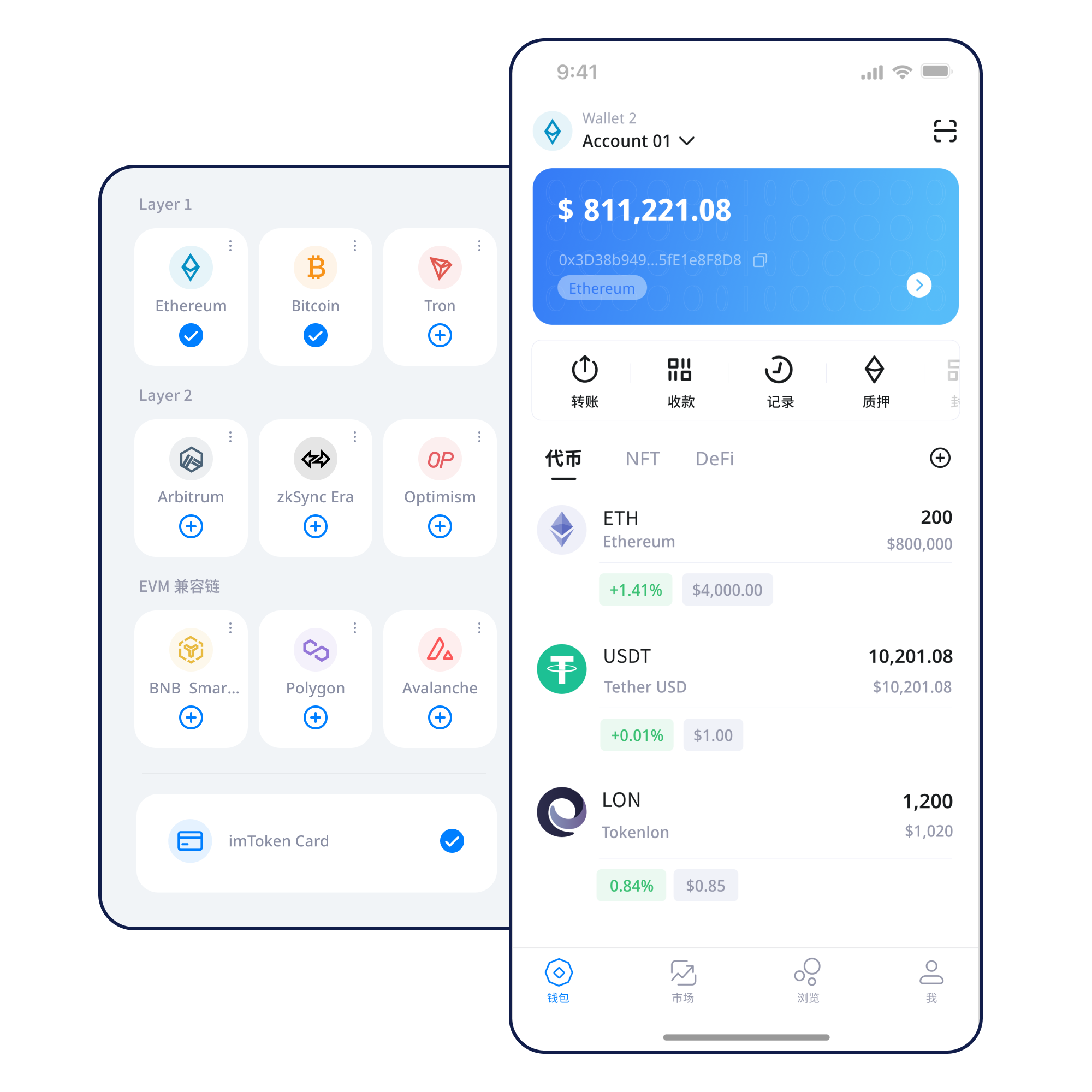
Understand what a new wallet creates and which information represents control.
Start here →Keep the seed phrase offline rather than in screenshots, cloud sync or messages.
Backup principles →Verify the receiving address and intended network rather than relying on the token name.
Receiving guide →Review address, network, amount and gas before deliberately submitting.
Transfer checks →Verify the domain, then review the account, signature and approval scope.
DApp guide →Balance viewing, transfers, browser connections and backups touch different parts of the wallet and carry different verification requirements.
A single wallet can display several networks while each chain keeps its own state, gas asset and confirmation model. Similar address formats do not make networks interchangeable.
Confirm the address and network before receiving; review the amount, gas, token and transaction hash when sending.
See the transfer flow →Mobile network management, balance viewing and transaction history with device security and offline backup still under the user’s control.
Browser connectivity supports Web3 access. Connections, signatures, approvals and actual transactions should be judged separately.
Learn browser connections →Never send a seed phrase or private key to anyone. Backups, approval management, device control and transaction checks work together.
Learn where assets live, how network fees work and how confirmations can be independently checked. Even if interactive controls are unavailable, the complete text remains readable.
Different networks maintain separate ledgers. A wallet can aggregate the view while assets still belong to a specific network.
Explore multi-chain →Transactions are broadcast, included in blocks and confirmed. Block explorers expose public evidence such as hashes and block height.
Learn public chains →
Chain IDs, gas assets, deployed contracts and state remain independent even when address formats look similar.
Understand EVM →
Cross-layer transfers can involve bridges, waiting periods and exit mechanisms that differ from same-network transfers.
Learn Layer 2 →
Gas is about execution cost; confirmations describe the transaction’s continuing on-chain status after inclusion.
Learn gas & confirmations →Use the site’s download entry rather than installation links sent by strangers.
Understand the difference and use only a trusted device and application environment.
Keep the seed phrase offline, do not screenshot it, and never disclose a private key.
Identify the network, its gas asset and the intended destination.
Review the address, network and amount before confirming.
Read DApp requests, keep transaction hashes and periodically remove permissions you no longer need.
Web3 flows often contain several actions in sequence. Reading each step separately keeps a successful connection from becoming automatic consent to everything that follows.
Use a trusted route.
Check spelling, HTTPS and source.
Confirm the requested account and network.
Understand what public information is being requested.
Focus on contracts, spenders, allowances and permissions.
Verify that the on-chain result matches your intent.
Also review any approval that may remain.
Users keep their own seed phrases and private keys, and official staff will never ask for them. Before transferring, signing or approving, verify the address, network, amount, contract and permission scope. On-chain transactions usually cannot be reversed by a wallet provider, while third-party DApps and smart contracts can carry independent risk.
Public computers, unknown extensions, remote-access tools and untrusted networks can increase exposure. Consider removing approvals that are no longer needed and keep both devices and backups under your control.
Open Security CenterStart with addresses, seed phrases and private keys, then learn how networks, gas and transaction hashes provide verifiable context before moving into DApps, signatures and approvals.
An address is normally public and can receive assets, while seed phrases and private keys can represent control and must remain private. Networks define where transactions execute, gas pays for network work, and transaction hashes make results inspectable in a block explorer.
Start the learning path →Understand nodes, blocks and transaction evidence.
Learn gas, contract addresses and approvals.
Base-network relationships, bridging and settlement.
Review spenders, allowances and revocation.
Backups, devices, scams and transaction checks.
Keep common terms connected to their purpose.
Ethereum PoS uses validators in consensus. Reward sources, network state, withdrawals and exits affect participation, and rewards are not fixed.
Learn Ethereum staking →Validators can face penalties, exits can require waiting, smart contracts carry technical risk, asset prices fluctuate and third-party services add separate risk.
Understand PoS & validators →Additional material covers confirmations, address checks and cross-layer transfers.
Stop if someone requests secrets, remote control or a “recovery verification” process.
Connecting an account is not the same as granting asset permissions.
Ethereum PoS rewards can change and validators are subject to network conditions and penalties.
Digital assets are recorded on their blockchains. A wallet controls addresses with keys and reads on-chain balances; the app itself is not the ledger.
A seed phrase can derive wallet keys, while a private key is specific secret key material. Both should be kept offline and private.
No. imtoken will never ask for a seed phrase, private key or verification code.
Assets with similar names can exist on different networks and address formats can look alike, so both sides must confirm the intended network.
Gas is the fee mechanism for executing transactions or contract calls and can vary with network rules, complexity and congestion.
A transaction hash can be used in a block explorer to inspect status, block inclusion, sender, recipient and execution result.
Usually a connection establishes a session only. Later signatures, transactions and token approvals must be reviewed separately.
Before downloading, make sure you understand seed backups, network selection and transaction checks.